 BrainBench, or how to simplify recruiting a bit
I’ve been a brainbench.com member since 2004, way back when they still mailed you a paper version of your certificates for free when you completed an assessment. (This was cool).
I’ve just recently taken one of their tests again, out of curiosity, and I have to say: They still “have it”. The questions are difficult, to the point yet not insane. They have a real nice balance. I will definitely be using their corporate service again, when I need to recruit.
I’ve found it to be an amazing bull-filter before. Plus, the free personality tests are interesting…
Compex WP18/IXP425 Port Completed
I’ve spent most of December hacking on an Intel IXP425 device, and I must say, I’m rather amazed at the performance these little things pump out. Mikrotik needs to forget about the Mips architecture. It’s outdated and performs crappily. I’ve tested this little board clocking over 80Mbps ROUTED traffic between interfaces.
The PCengines WRAP, and Routerboard 532 is dead. Intel IXP425+ is where it’s at. You cannot find another chipset with integrated VLAN support, hardware crypto acceleration, integrated USB, I2C, and all the other fancies for the same price.
The device I ported to OpenWRT and registered in the ARM machine registry is the Compex WP18 a very nice general purpose network and wireless device.
Software stacks and basic programmer courtesy
When will commercial software vendors start owning up to their “free” roots? I just installed some software tonight, that’s well over two years old, using PPPoE to communinicate with a modem, and it conflicted with my installed version of WinPCAP.
Of course, WinPCAP is not mentioned as a component in the orignal software, WHATSOEVER.
Way to stick to the licenses guys! I will quote from the WinPCAP license documentation:
1. Redistributions of source code must retain the above copyright notice, this list of conditions and the following disclaimer.

2. Redistributions in binary form must reproduce the above copyright notice, this list of conditions and the following disclaimer in the documentation and/or other materials provided with the distribution.
Total disregard. And in this case, it’s the THIRD PARTY SOFTWARE PROVIDER to the actual Hardware vendor provider who is in breach.
Man. The Software world is screwed.
How to get local routing(BGP) info for South Africa
I recently went on a mission to discover, which subnets are “local” to South African networks, whether by ISP peering arrangements, or direct connection. I wanted this information, so that I could setup my home linux router to use Telkom’s ADSL connection for local traffic, and to use Sentech’s MyWireless connection for international traffic. Reason: Sentech pings aren’t really good for local gaming, but international speeds are great.
BGP (Border Gateway Protocol)
All route information is published, and synchronized between ISP peers, via the BGP protocol, which is a dynamic routing protocol.
Unfortunately, it’s not as simple as install something like Zebra (a routing daemon for linux that does BGP, set it up on a Linux machine, receiving a BGP feend and have it make clever routing decisions.
No ISP will let you connect to their routers’ BGP port. Easily, or without a fight, or without paying them money for transit. This kind of public routing information, is unfortunately only available to the end-user via a series of public route-servers, and there aren’t any that I know that will allow you to receive the feed via BGP either.
So, I looked at alternative methods. I went from writing scripts to dig through the ripe, arin, and radb databases, to turning to lists of IP ranges arrange by geographic location. All the time, using whois queries to resolve the AS (AutonomousSystem) numbers, and then querying them for their official public routes. The problem is, that these routing databases aren’t always up to date, and that it’s quite difficult to figure out which AS numbers are actually local ISPs.
AS Numbers
An AS number is a unique number, assigned by ARIN, or RIPE, that defines a BGP routing “area” or an ISP. Internet Solutions’ AS number is 3471. To see the details in the registry for an AS, go to http://www.radb.net/cgi-bin/radb/whois.cgi?obj=AS3741
To see the routes published by this AS, go to http://www.radb.net/cgi-bin/radb/whois.cgi?obj=!gAS3741
There is a set of RESERVED AS numbers, similar to “reserved” IP ranges that is supposed to be used for people that don’t have AS’s to obtain BGP information, or used for private or interior routing. Again, good luck in finding someone that’s prepared to configure a feed for you using a private AS, on a dynamic IP such as ADSL.
In the end, Gregory Massel, of http://www.ispmap.org.za/ fame, helped me to get hold of directly accessible BGP route information, courtesy of telnet://route-server.is.co.za, a public service by Internet Solutions. SAIX also runs a route-server at telnet://tpr-route-server.saix.net/
I wrote a small script that would telnet to this router, and dump the BGP routing table. This table contains local subnets, which is exactly what I was after.
From here on, it’s pretty simple to modify the script to add routes on my linux machine for these subnets on a specific interface. The net result in my scenario: ADSL gets used for local traffic, and Sentech for international.
Example script:
#!/usr/bin/perl

use Net::Telnet;

$prompt = '/public-route-server>/';
$server="route-server.is.co.za";

print "Connecting to $servern";
my $session = Net::Telnet->new(Host => $server,Prompt => $prompt,Timeout=>30);
unlink("t.log");
$session->dump_log("t.log");

$session->waitfor($prompt);

#turn off paging
$session->cmd("terminal length 0");

#get list of local routes
print "Retrieving BGP routes\n";
my @output = $session->cmd("show ip bgp\n");
print @output;
print "Route list received\n";
$session->close;
Tribes:Vengeance Infinite Spawn Tool
o, I have to run a T:V server at a service provider that’ll only let me use FTP to administer my T:V server. This is a problem, because it becomes difficult to restart the server using FTP only 🙂
So I pulled out the good old Borland C++ compiler and started coding.
“Hah”, I said after a day or two to the service provider. “Please install this executable.”
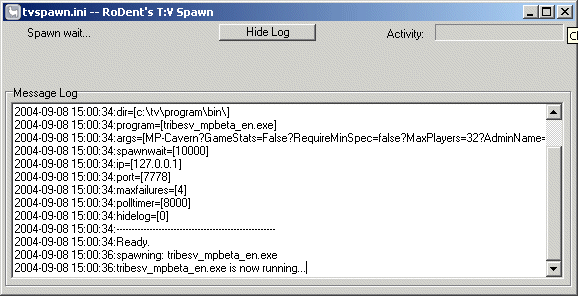
TVSpawn is similar to the ISpawn of T1, and T2 except it’s a bit more clever. It will restart the Tribes server, and itsself (TVSpawn) if it detects a change in it’s “.ini” file. This means that you can restart a T:V server running remotely by simply uploading a new .ini file with a new date/timestamp.
TVSpawn will also apply the settings inside the new .ini file upon restart, allowing you to change the server’s startup commandline on-the-fly. That’s the neat part.
The mediocre part is that it basically does the normal stuff that T1/T2’s ISpawn did, which is monitoring the server on it’s query port (typically port 7778) to see if it’s still responding. If the polls to port 7778 fails a predetermined number of times (maxfailures in the .ini) it will assume that the server died and respawn it.
The program and and an example ini file is available here: https://rodent.za.net/files/tribes/tvspawn/
Installation:
- Drop the .ini, and .exe into our tvprogrambin directory.
- Edit the .ini and fix all the paths/settings to your liking.
- Run it.
What it does:
- Uses a .ini to read it’s configuration
- Will restart the T:V server, and itsself if the configuration file changes (date,size, etc…)
- Polls the T:V server on it’s GaySpy port, to ensure it’s alive.
- Restarts the T:V server if it stops responding to polls (maximum failures configurable in the .ini)
- Restart the T:V server if it exits
- Applies a “startup delay” (spawnwait in .ini) whenever the process is restarted to prevent insane respawning.
- Has mostly all options configurable in the .ini file
Hints:
- tvspawn.exe will take a single commandline argument. The name of the .ini file. Thus, if you want to run multiple servers, with different configurations, run “tvspawn.exe myserver.ini” to have it use a different .ini file. By default (if no commandline arguments are specified) it will look for tvspawn.ini in the current directory.
- Set “hidelog=1” in the .ini file to have a “slim” version, minus the log window started up. You can always review the log by clicking on the “Show Log” button.
To Do:
- Make it a configurable, and installable service, with a service name for each .ini
- Get an icon that isn’t a Llama.
- Include a small socket server that’ll accept remote commands, such as “reset”, “status”, and “booyah!”.
Mail me at rodent at rodent dot za dot net, if you have tips, suggestions etc…