Uncategorized
 Tribes:Vengeance Infinite Spawn Tool
o, I have to run a T:V server at a service provider that’ll only let me use FTP to administer my T:V server. This is a problem, because it becomes difficult to restart the server using FTP only 🙂
So I pulled out the good old Borland C++ compiler and started coding.
“Hah”, I said after a day or two to the service provider. “Please install this executable.”
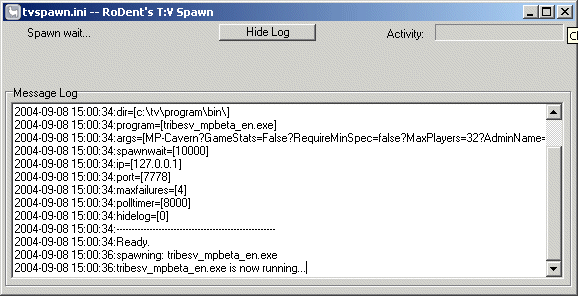
TVSpawn is similar to the ISpawn of T1, and T2 except it’s a bit more clever. It will restart the Tribes server, and itsself (TVSpawn) if it detects a change in it’s “.ini” file. This means that you can restart a T:V server running remotely by simply uploading a new .ini file with a new date/timestamp.
TVSpawn will also apply the settings inside the new .ini file upon restart, allowing you to change the server’s startup commandline on-the-fly. That’s the neat part.
The mediocre part is that it basically does the normal stuff that T1/T2’s ISpawn did, which is monitoring the server on it’s query port (typically port 7778) to see if it’s still responding. If the polls to port 7778 fails a predetermined number of times (maxfailures in the .ini) it will assume that the server died and respawn it.
The program and and an example ini file is available here: https://rodent.za.net/files/tribes/tvspawn/
Installation:
- Drop the .ini, and .exe into our tvprogrambin directory.
- Edit the .ini and fix all the paths/settings to your liking.
- Run it.
What it does:
- Uses a .ini to read it’s configuration
- Will restart the T:V server, and itsself if the configuration file changes (date,size, etc…)
- Polls the T:V server on it’s GaySpy port, to ensure it’s alive.
- Restarts the T:V server if it stops responding to polls (maximum failures configurable in the .ini)
- Restart the T:V server if it exits
- Applies a “startup delay” (spawnwait in .ini) whenever the process is restarted to prevent insane respawning.
- Has mostly all options configurable in the .ini file
Hints:
- tvspawn.exe will take a single commandline argument. The name of the .ini file. Thus, if you want to run multiple servers, with different configurations, run “tvspawn.exe myserver.ini” to have it use a different .ini file. By default (if no commandline arguments are specified) it will look for tvspawn.ini in the current directory.
- Set “hidelog=1” in the .ini file to have a “slim” version, minus the log window started up. You can always review the log by clicking on the “Show Log” button.
To Do:
- Make it a configurable, and installable service, with a service name for each .ini
- Get an icon that isn’t a Llama.
- Include a small socket server that’ll accept remote commands, such as “reset”, “status”, and “booyah!”.
Mail me at rodent at rodent dot za dot net, if you have tips, suggestions etc…
GameSpy threatens litigation against developer
GameSpy has a bit of a monopoly around online services for multiplayer games, including server listings etc. They use a lame XOR encryption technique to ‘restrict’ third party access to these master servers. Fortunately, due to their monopoly they can’t really quickly change things without breaking it all, and thus the algorithm has been documented and became available for opensource developers thanks to the efforts of Luigi Auriemma of http://aluigi.altervista.org.
Unfortunately GameSpy then decided it would be good to threaten him with litigation.
Yay. Go Go GameSpy. Read about this pretty sad story at http://aluigi.altervista.org/papers.htm#distrust
GarageGames
This is the company that the ex-developers of Dynamix went to, when [Vivendi] started firing all the talented people that made them rich. These guys rock, and are the next generation studio to be watching.
Linux Development – The pleasure and the pain
Developing software under Linux can be a pleasure. It can also be a real pain. The following are just *some* of my observations about it.
Why Linux, GNU, and GCC tools are great:
- It’s the best standards-based compiler in the world:
I mean it. Nothing beats it’s stability in terms of being able to gronk code written in ANSI, or ISO, or GNU’ish C. - Most cross platform toolchain:
GCC, and tools are the most cross platform compiler, and from all compiler’s I’ve used, allows the most fine-grained control of code optimisation. Aside from that, the assembly code it produces is very optimal, regardless of the platform you code on. Hell, I can even cross-compile Windows code on Linux, and the resulting stuff runs better than what native compilers can produce.
Why Linux, GNU, and GCC tools suck
- Newer versions of GCC suck:
Specifically the 3.x series just plain suck. GCC 2.95.3+ are the most stable GNU compilers ever. I don’t know why they even bothered with the 3.x series. It just broke everything, and it’s speed/performance is atrocious. (update: GCC 4 again moved back to ‘stable’ predictable) - Lack of development IDE:
I’m a vim, and grep man myself, but the fact is there are very few good IDE’s for the GCC collection. Sure, there are tools. I know, I’ve tried most of them. The fact is, that none of them come close to the INTEGRATED experience that is Microsoft’s Visual C++ (update: I refuse to Eclipse thank you) - Lack of integrated ASSEMBLY level debugger:
Yes, I know about VGDB, and the myriad of other tools out there that front-end GDB, but let’s face it. They’re all still GDB, with a crappy shell. And GDB has never integrated well into any IDE. Hell, even free Windows debuggers (Assembly/source) such as OllyDbg kick the pants out of GDB.
I know many would say that console level, command prompt driven debugging is the only way to go, but even Visual C++ is able to produce a _proper_ stack backtrace, and produce readable disassemblies from running code, even without debug information. OllyDbg’s code analysis takes it to the next level.Fact is, that even Visual C++’s debugging capabilities kicks GDB and any other available tool for Linux’s behind. - !MAN (manual pages) suck:
Yes, I know that may sound weird. But manpages do suck. Sometimes the actual documentation is more damaging, than not having any documentation at all. Then, there’s the interface, and search capabilities, and just the arrangement of manual pages. Yes, I know there’s tools like apropos, and a myriad other to enhance the searching, but there’s still _nothing_ GNU tools can offer that matches the well maintained, and usable format of Microsoft’s MSDN library. It’s a pity.