o, I have to run a T:V server at a service provider that’ll only let me use FTP to administer my T:V server. This is a problem, because it becomes difficult to restart the server using FTP only 🙂
So I pulled out the good old Borland C++ compiler and started coding.
“Hah”, I said after a day or two to the service provider. “Please install this executable.”
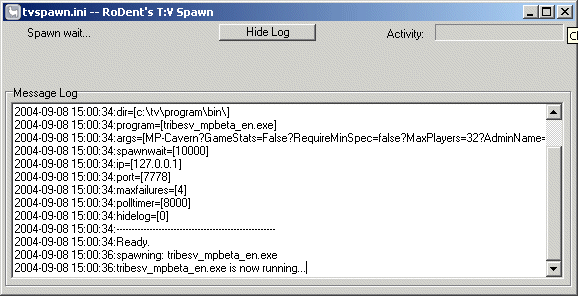
TVSpawn is similar to the ISpawn of T1, and T2 except it’s a bit more clever. It will restart the Tribes server, and itsself (TVSpawn) if it detects a change in it’s “.ini” file. This means that you can restart a T:V server running remotely by simply uploading a new .ini file with a new date/timestamp.
TVSpawn will also apply the settings inside the new .ini file upon restart, allowing you to change the server’s startup commandline on-the-fly. That’s the neat part.
The mediocre part is that it basically does the normal stuff that T1/T2’s ISpawn did, which is monitoring the server on it’s query port (typically port 7778) to see if it’s still responding. If the polls to port 7778 fails a predetermined number of times (maxfailures in the .ini) it will assume that the server died and respawn it.
The program and and an example ini file is available here: https://rodent.za.net/files/tribes/tvspawn/
Installation:
- Drop the .ini, and .exe into our tvprogrambin directory.
- Edit the .ini and fix all the paths/settings to your liking.
- Run it.
What it does:
- Uses a .ini to read it’s configuration
- Will restart the T:V server, and itsself if the configuration file changes (date,size, etc…)
- Polls the T:V server on it’s GaySpy port, to ensure it’s alive.
- Restarts the T:V server if it stops responding to polls (maximum failures configurable in the .ini)
- Restart the T:V server if it exits
- Applies a “startup delay” (spawnwait in .ini) whenever the process is restarted to prevent insane respawning.
- Has mostly all options configurable in the .ini file
Hints:
- tvspawn.exe will take a single commandline argument. The name of the .ini file. Thus, if you want to run multiple servers, with different configurations, run “tvspawn.exe myserver.ini” to have it use a different .ini file. By default (if no commandline arguments are specified) it will look for tvspawn.ini in the current directory.
- Set “hidelog=1” in the .ini file to have a “slim” version, minus the log window started up. You can always review the log by clicking on the “Show Log” button.
To Do:
- Make it a configurable, and installable service, with a service name for each .ini
- Get an icon that isn’t a Llama.
- Include a small socket server that’ll accept remote commands, such as “reset”, “status”, and “booyah!”.
Mail me at rodent at rodent dot za dot net, if you have tips, suggestions etc…